How to Run the Disney World Marathon on Your Treadmill
A complete guide to simulating the WDW Marathon course on your treadmill — pace targets, where the course actually climbs, character spotting, and the apps that make it feel real.
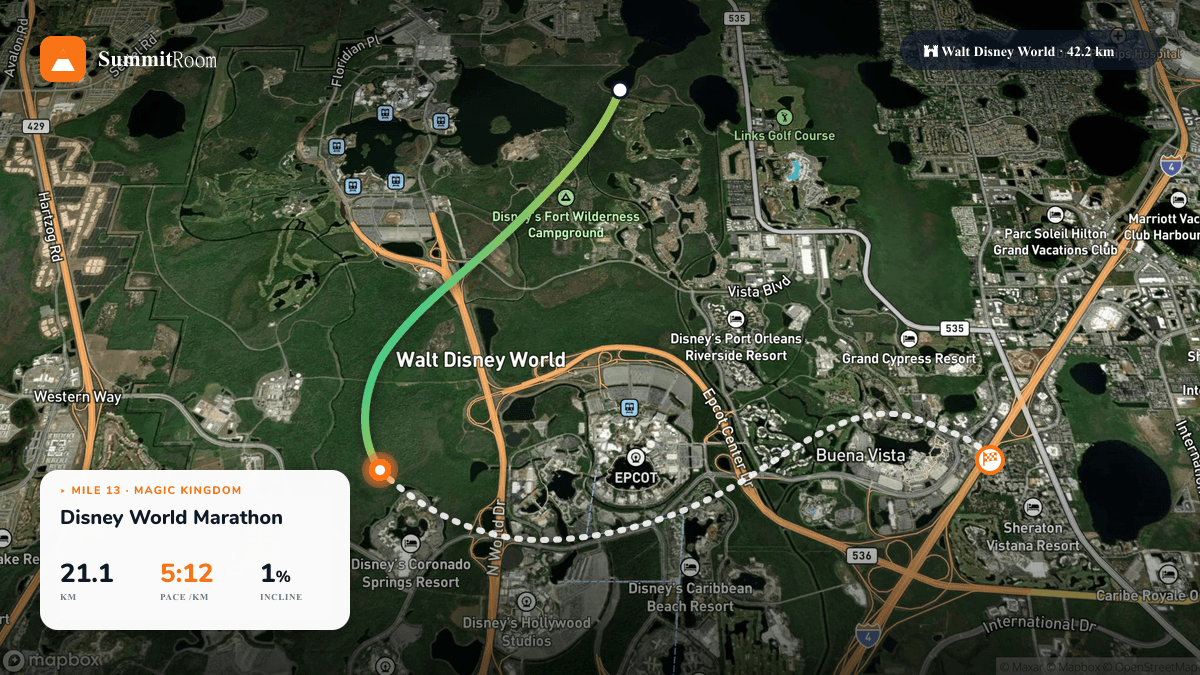
The Walt Disney World Marathon is on most runners' bucket lists. But what if you live nowhere near Orlando, the lottery missed you, or the January travel just isn't in the budget this year? You can still run the course — every kilometre of it — on your treadmill.
This guide covers exactly how to run the Disney World Marathon on a treadmill: the course profile, where to set your incline, pacing strategy, and which apps actually simulate the course (not just play a video while you sweat in place).
Why simulate Disney on a treadmill?
Two reasons people search for this:
- Training. You got in, but the closest hill near you is the highway overpass. You want to know exactly what Mile 17 through Animal Kingdom feels like before race day.
- Bucket-list. You'll never run it in person, but a 26.2 in your basement with Disney music piping in is the next best thing — and it counts.
Either way, the secret sauce is automatic incline matching. Disney is famously flat, but it's not zero. The course rolls through ~190 ft of elevation gain across 4 theme parks, and your treadmill should reflect that.
The course at a glance
| Segment | Where | Elevation profile |
|---|---|---|
| 0–6 mi | Magic Kingdom approach | Mostly flat, gentle rises onto the Polynesian causeway |
| 6–13 mi | Magic Kingdom + Animal Kingdom | Bridges over Bay Lake — short, sharp climbs around mile 6.5 and 10 |
| 13–20 mi | ESPN Wide World of Sports | Flat. This is where the marathon is won or lost |
| 20–26.2 mi | Hollywood Studios → Epcot finish | Rolling false flats, one notable overpass at mile 24 |
If you've ever run it: yes, the late-race overpasses are real and they hurt.
Setting up the treadmill
You have three options, ranked best → worst for an authentic simulation:
1. Bluetooth FTMS treadmill + an app that drives incline
This is the gold standard. If your treadmill supports the FTMS (Fitness Machine Service) Bluetooth profile, an app like SummitRoom can:
- Stream the actual GPX course of the marathon onto a 3D map
- Automatically set your treadmill's incline to match every elevation change
- Track your pace, distance and split times against your goal
You're not pretending. You're physically climbing every bridge.
2. Manual mode + an app that shows the incline target
If your treadmill doesn't have Bluetooth, you can still match the course manually. SummitRoom's manual mode shows you the target incline as you progress; you just nudge the +/− button on the console when the prompt fires.
It's a few seconds of attention per segment, but you stay in sync with the real course.
3. Watch a video, run flat
Better than nothing, but you miss the climbs entirely. You'll run faster than you would in Florida, which makes the eventual race day a rougher surprise.
Pacing strategy
Disney is a start-slow course. The first 6 miles drag you forward with crowd energy in person; on a treadmill, you'll have to fake the restraint yourself.
A reasonable simulation:
- Mile 1: 30 seconds slower than goal pace. You'd be in a corral. Be patient.
- Mile 2–13: settle into goal pace. Use the climbs to reset breathing.
- Mile 13–20: this is the flat section where Disney wins or loses. Hold pace, don't bank time.
- Mile 20–26.2: pace falls naturally. If you can hold marathon pace +5–10s/mi over the overpasses, you've earned it.
Make it actually fun
A treadmill marathon is a long time alone with your thoughts. Some additions that help:
- Disney music playlist. Yes really. The course plays Disney music constantly in person.
- Fan + cold water. Disney is humid even in January. You'll lose more fluid than you think indoors.
- Set up a real fueling table. 26.2 on a treadmill is the same caloric expenditure as on a road.
- Pre-loaded photos of each park. Glance up at the screen as you pass each mile marker.
If you're using SummitRoom, the 3D map automatically pans through each park as you pass it — Magic Kingdom castle, Tree of Life at Animal Kingdom, Spaceship Earth at Epcot at the finish. It's not "being there", but the visual anchoring breaks the marathon into 4 short runs instead of one long one.
What about Strava credit?
If you use SummitRoom, every treadmill marathon uploads to Strava the same way a road run would — with the actual Disney GPS track, elevation profile, splits and pace map. It looks identical to a real Disney run in your activity feed.
Whether that counts as "running the marathon" is up to you. But the calories, training adaptation, and the Strava kudos are real.
TL;DR
- Use an FTMS-capable treadmill + an app like SummitRoom for true auto-incline.
- The course is flat-with-roll. Don't underestimate the bridges at miles 6.5 and 10.
- Start slow. Hold the middle. Survive the overpasses.
- Disney music + a fan + real fueling = not a chore.
Whether it's training or your only shot at the medal, a treadmill Disney Marathon is closer to the real thing than people think.
Try SummitRoom yourself
Turn any treadmill into a virtual run through Disney, Boston, Pikes Peak. Free to start, no install.
▶ Try the 1-minute demo